Workout Tracker Spreadsheet: Columns and Formulas
A workout tracker spreadsheet needs six columns: date, exercise, weight, reps, estimated 1RM and volume. Two formulas fill the last two, =ROUND(C2*(1+D2/30),1) and =C2*D2. Add SUMIFS for weekly volume and the same sheet runs in Excel and Google Sheets. It strains once you log from a phone between sets.
On this page
The six columns a workout tracker spreadsheet needs
Put one set on each row. A session of three bench sets is three rows, so every number stays a plain number and every formula stays short. The first row holds the headers, and the data starts in row 2.
| Column | Header | What goes in it | Example |
|---|---|---|---|
| A | Date | The day you trained, as a real date | 26 Oct 2026 |
| B | Exercise | One fixed name per lift | Bench press |
| C | Weight (kg) | The total on the bar | 82.5 |
| D | Reps | Reps you completed | 9 |
| E | Est. 1RM | Formula (below) | 107.3 |
| F | Volume | Formula: weight × reps | 742.5 |
Use a date format, not text. A date column lets you sort and filter by week later. If you train in pounds, swap the header to Weight (lb) and keep the whole sheet in one unit.
Want to track warm-ups, tempo or how a set felt? Add a Notes column at the end, and leave it out of every formula.
Four formulas for Excel and Google Sheets
These use only functions both programs share (one needs a recent Excel, noted below). Type the first one into E2 and the second into F2, then drag them down as you add rows.
| You want | Formula | Needs |
|---|---|---|
| Estimated 1RM for a set | =ROUND(C2*(1+D2/30),1) | Any version |
| Volume for a set | =C2*D2 | Any version |
| Volume for one week, one lift | =SUMIFS(F:F,B:B,"Bench press",A:A,">="&H2,A:A,"<"&H2+7) | Excel 2007 or later; Google Sheets. H2 holds the Monday |
| Best estimated 1RM for a lift | =MAXIFS(E:E,B:B,"Bench press") | Excel 2019 or Microsoft 365; Google Sheets |
The first formula is the Epley estimate, the same one behind our 1RM calculator. It is a rule of thumb. For a closer look at when it holds up, see the 1RM percentage chart.
The weekly formula adds up column F for rows that match the exercise name and fall inside seven days. Put the Monday of the week in H2 and the formula in I2, outside the data columns, so it does not count itself.
Common mistake: typing the exercise name three ways. If one row says "Bench" while the rest say "Bench press", SUMIFS skips it without any error. The sum just comes out low.
A worked example: one session, then eight weeks of top sets
Here is one session with illustrative numbers, Monday 26 October, with the formulas filled in. The weights are in kg (82.5 kg is 182 lb), and the cells hold plain numbers.
| Date | Exercise | Weight | Reps | Est. 1RM | Volume |
|---|---|---|---|---|---|
| 26 Oct 2026 | Bench press | 82.5 | 9 | 107.3 | 742.5 |
| 26 Oct 2026 | Bench press | 82.5 | 8 | 104.5 | 660 |
| 26 Oct 2026 | Bench press | 82.5 | 7 | 101.8 | 577.5 |
The weekly SUMIFS for that Monday returns 742.5 + 660 + 577.5 = 1,980 kg (4,365 lb). If the last row had been typed as "Bench", it would return 1,402.5 kg, with no warning that a set went missing.
Now take the top set of each week for eight weeks. Column E turns them into one line.
| Week | Top set (kg × reps) | Est. 1RM (kg) |
|---|---|---|
| 1 | 75 × 8 | 95.0 |
| 2 | 75 × 9 | 97.5 |
| 3 | 77.5 × 8 | 98.2 |
| 4 | 77.5 × 9 | 100.8 |
| 5 | 80 × 8 | 101.3 |
| 6 | 80 × 9 | 104.0 |
| 7 | 82.5 × 8 | 104.5 |
| 8 | 82.5 × 9 | 107.3 |
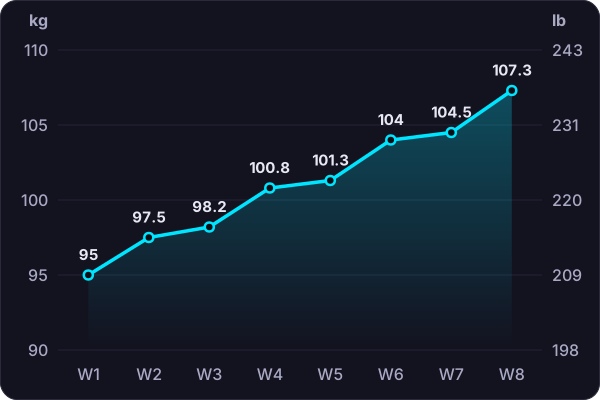
The line shows what the raw weights hide. Weeks 3 and 4 both use 77.5 kg, yet the estimate rises from 98.2 kg to 100.8 kg because the reps went from 8 to 9. That is the double progression pattern showing up in your own data.
- Copy each week's top set into a small table with two columns: the date and its Est. 1RM.
- Insert a line chart from that table. Excel and Google Sheets both have one.
- Check it weekly. A line that stays flat for several weeks is a sign to look at your program. See how to track progressive overload for what to change.
Where a workout tracker spreadsheet breaks
A sheet is flexible, and Google Sheets is free. These are the points where lifters tend to drop it:
- Entry on a phone. Tapping into a grid between sets means zooming, scrolling and landing on the right cell. It is easy to put it off until after the session.
- No last-session prompt. The sheet does not tell you what you lifted last week. You scroll or filter to find it, then decide today's weight.
- Silent errors. A misspelled exercise name or a date typed as text still saves, and SUMIFS skips that row without an error.
- Charts are manual. Each new exercise needs its own filter and its own chart.
- No rest timer. The sheet cannot time your rest between sets. See how long to rest between sets for why it is worth watching.
If none of these bother you, keep the sheet. A tracker you use every session beats a better one you skip.
Move the spreadsheet into an app without retyping
Switching does not mean starting from zero, and a short app trial is enough to check an import before you commit. A log with a few months of dated rows is worth keeping, because your charts are only as useful as the history behind them.
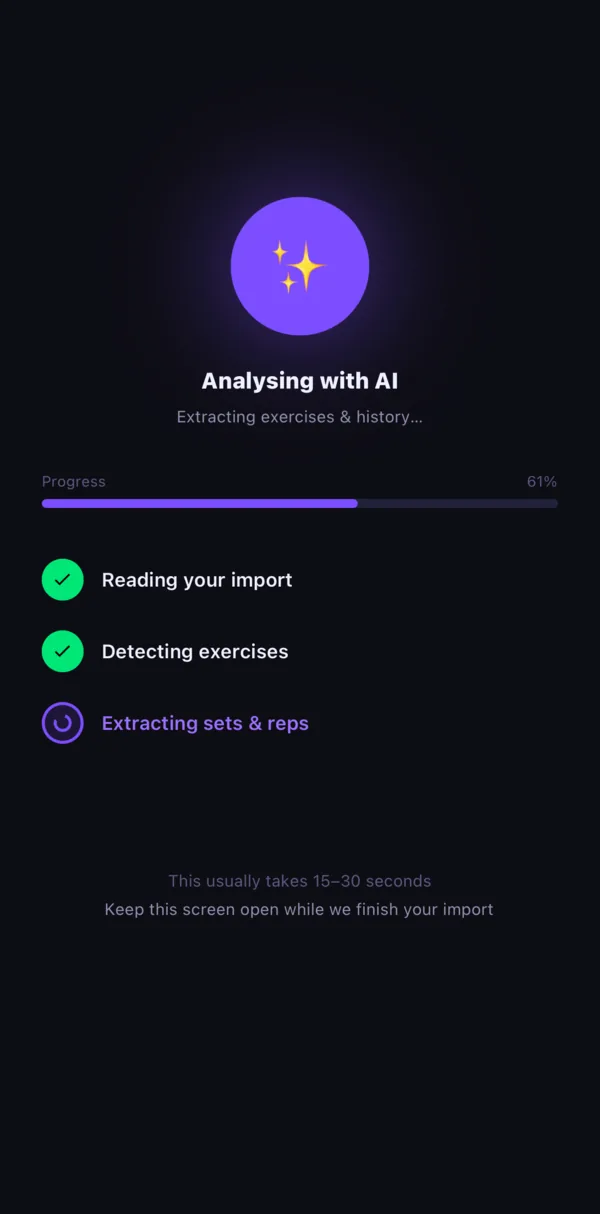
In Lifter Log, open the AI import and upload the file: Excel, CSV or PDF, or up to 8 photos of your log. The AI reads the exercises, sets, reps and dates.
Dated sessions come in as history, so your progress charts start with data in them. It usually takes 15 to 30 seconds, and it needs a connection.
One tip makes the import cleaner:
- Tidy the sheet first. Use one name per lift and keep a date on every row. Lifter Log also matches imported exercises to a library of about 900 moves.
Check the result once it lands, as you would after exporting your history from another app. The accuracy depends on the source, so skim a few exercises against the sheet before you trust it.
When to keep the spreadsheet
A spreadsheet is still the right tool in some cases:
- You train from a coach's sheet and only log once a week.
- You want a custom column, such as bar speed or a weekly body-weight average, that your app may not offer.
- You do your analysis on a laptop and only need somewhere to store the numbers.
If you log on your phone, it is a different story. The logging guide covers what a good entry looks like, whatever tool you pick, and the feature list shows how Lifter Log handles it.